Shopify vs WordPress: The Real Cost Comparison for 2026
What Shopify and WordPress actually cost once you add apps, transaction fees, plugins, and hosting — and how to tell which one is cheaper for your specific store.
By - Migration Master Editorial Team
The sticker price is the wrong number to compare
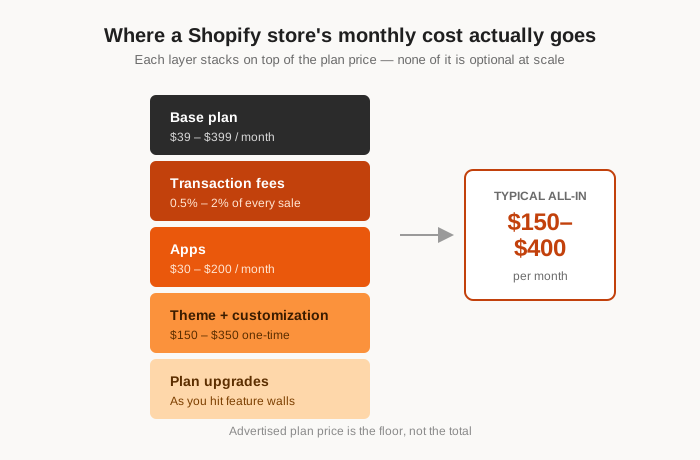
Shopify's $39/month plan and a $10/month WordPress host look like an easy decision on paper. They're not comparable numbers. Shopify's plan price is the floor, not the ceiling—apps, transaction fees, and theme costs stack on top of it every month. WordPress's low number is the floor too, but what stacks on top is mostly one-time or optional, not recurring by default.
The real comparison isn't plan vs. plan. It's total cost of ownership over 12–24 months, once you account for how each platform actually gets used by a real store.
What Shopify actually costs once you're running a real store
Here's where the number moves after month one:
- Transaction fees on top of your payment processor's cut, unless you use Shopify Payments exclusively —this alone can run 0.5–2% of every sale.
- Apps for things that are core functionality elsewhere: reviews, SEO, upsells, email capture, subscriptions. Three or four paid apps at $10–$50/month each is typical for a store past the hobby stage.
- Premium themes, usually a one-time $150–$350 cost, but often followed by paid theme customization since Liquid edits aren't beginner-friendly.
- Plan upgrades as you hit feature walls— custom reports, lower transaction fees, and staff accounts all live behind higher tiers.
A store doing meaningful volume commonly lands at $150–$400/month all-in, well past the advertised plan price.
What WordPress actually costs once you add what Shopify includes
WordPress's low floor is real, but it's not free of trade-offs either. To match what Shopify gives you out of the box, you're typically adding:
- WooCommerce (free) plus a payment gateway plugin —usually free, with the processor taking its normal card fee and nothing extra layered on by the platform.
- Hosting built for WooCommerce, typically $20–$80/month depending on traffic and whether it's managed.
- A handful of plugins for SEO, backups, and security—many with capable free tiers, unlike most Shopify app equivalents.
- Developer time, which is the real variable cost. A DIY-comfortable owner spends very little here; a store needing custom design or complex logic will pay for it, the same way a complex Shopify build needs a paid theme developer too.
A comparable WordPress/WooCommerce store commonly lands at $40–$150/month all-in—lower than Shopify at the same feature level, mainly because there's no per-transaction platform fee stacking on every sale.
The number that actually decides it: transaction fees at scale
For a store doing $10,000/month in sales, a 1% transaction fee is $100/month—quietly larger than most individual app subscriptions, and it scales with revenue instead of staying flat. At $50,000/month, that's $500/month, every month, forever, regardless of how lean the rest of your stack is.
WooCommerce has no equivalent platform fee. You pay your payment processor's standard rate either way, but nothing extra goes to the platform itself. This is the single biggest reason cost comparisons flip in WordPress's favor as revenue grows, even though Shopify can look cheaper at launch.
Where Shopify wins on cost instead
To be fair to Shopify: hosting, security, and uptime are bundled into the plan price, with no separate host to choose or manage. There's no developer needed to keep the store online, patched, or fast. For a store that wants zero infrastructure decisions and values that over lower fees, Shopify's price is buying real convenience, not just marketing.
The trade-off is closer if you don't use a managed WordPress host and end up handling updates, backups, and security yourself —that time has a cost too, even if it never appears on an invoice.
A simple way to run your own numbers
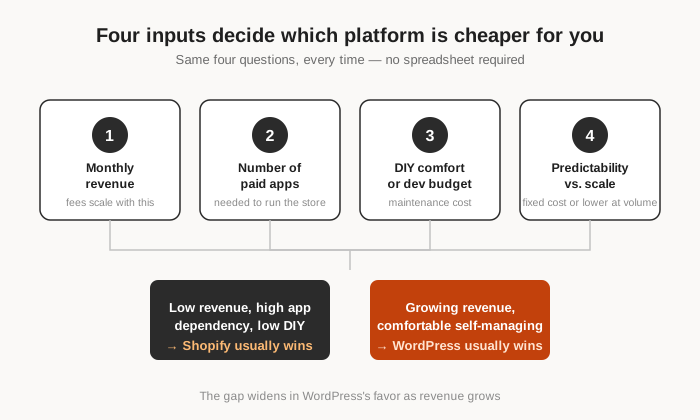
You don't need a spreadsheet consultant for this. Four inputs get you a real answer:
- Your average monthly revenue (transaction fees scale with this).
- How many paid apps or plugins your store actually needs.
- Your comfort level with basic WordPress maintenance, or the cost of paying someone else to handle it.
- Whether you value fixed monthly cost predictability over lower cost at scale.
Low revenue, high app dependency, low DIY comfort: Shopify usually wins. Growing revenue, willingness to self-manage or use a managed host: WordPress usually wins, and the gap widens every month your revenue grows.
If the numbers point to WordPress, migration is the remaining question
Cost comparisons are only half the decision if you already have a running Shopify store—the other half is whether moving puts your existing rankings, reviews, and content at risk. That's a separate, solvable problem, not a reason to stay on a more expensive platform by default.
We cover exactly what determines whether your SEO survives the move in this breakdown, including what a proper export preserves automatically and what's still on you afterward.
If you want to see what your own store's move would actually look like—slugs, categories, images, and all before committing to anything, this guide on how to migrate shopify products to wordpress shows exactly how to achieve it with comparetively lesser DIY.